

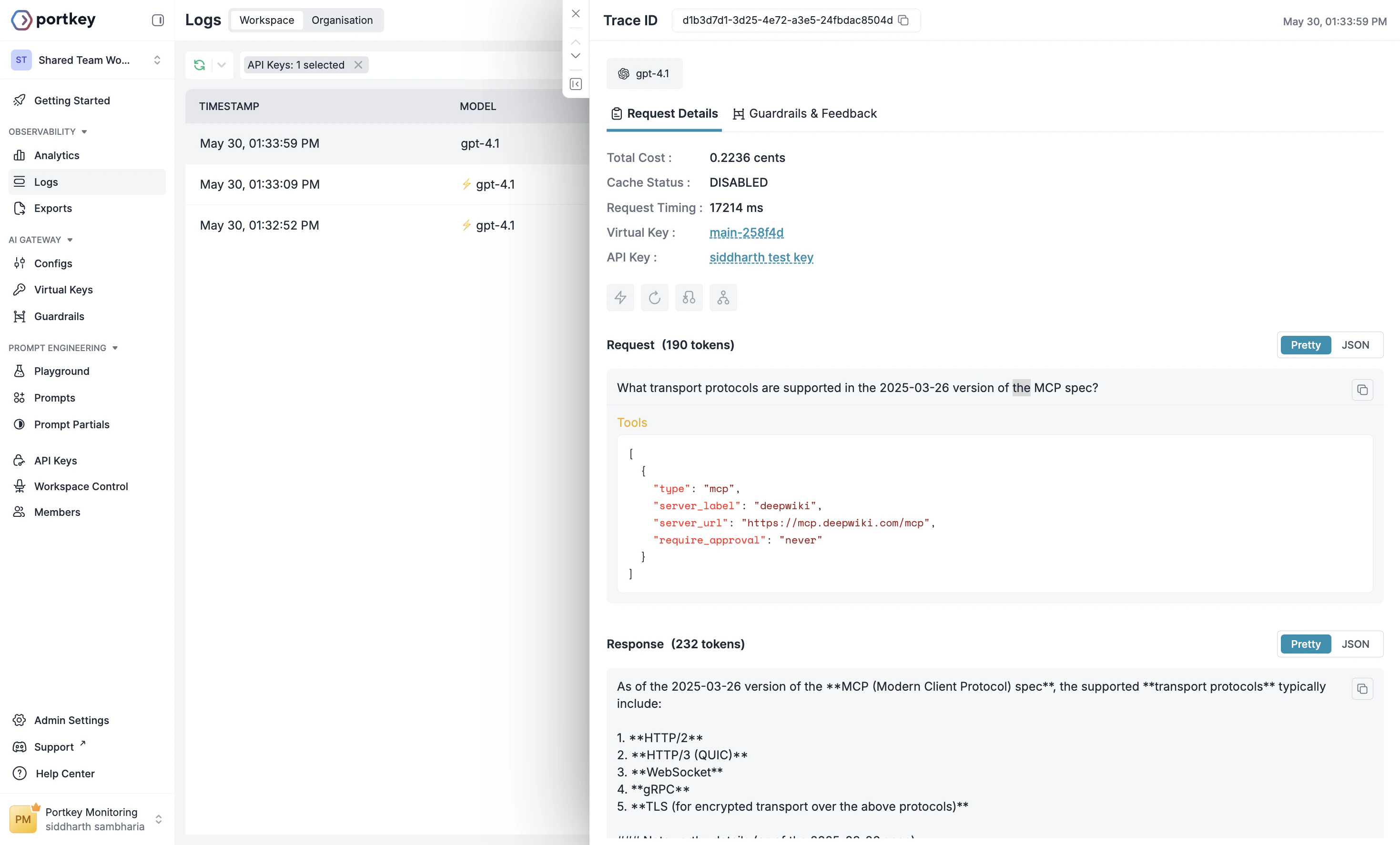
Model Context Protocol (MCP) is an open protocol that standardizes how applications provide tools and context to LLMs. The MCP tool in the Responses API allows developers to give the model access to tools hosted on Remote MCP servers. These are MCP servers maintained by developers and organizations across the internet that expose these tools to MCP clients, like the Responses API. Portkey Supports using MCP server via the Response API. Calling a remote MCP server with the Responses API is straightforward. For example, hereโ€™s how you can use the DeepWiki MCP server to ask questions about nearly any public GitHub repository.

Example MCP request

A Responses API request to OpenAI with MCP tools enabled.
curl https://api.portkey.ai/v1/responses \
  -H "Content-Type: application/json" \
  -H "x-portkey-api-key: $PORTKEY_API_KEY" \
  -H "x-portkey-virtual-key: $OPENAI_VIRTUAL_KEY" \
  -d '{
    "model": "gpt-4.1",
    "tools": [
      {
        "type": "mcp",
        "server_label": "deepwiki",
        "server_url": "https://mcp.deepwiki.com/mcp",
        "require_approval": "never"
      }
    ],
    "input": "What transport protocols are supported in the 2025-03-26 version of the MCP spec?"
  }'
import OpenAI from "openai";
import { PORTKEY_GATEWAY_URL, createHeaders } from 'portkey-ai'

const client = new OpenAI({
  apiKey: "xx", // Can be left blank when using virtual keys
  baseURL: PORTKEY_GATEWAY_URL,
  defaultHeaders: createHeaders({
    apiKey: "PORTKEY_API_KEY",
    virtualKey: "OPENAI_VIRTUAL_KEY"
  })
});

const resp = await client.responses.create({
  model: "gpt-4.1",
  tools: [
    {
      type: "mcp",
      server_label: "deepwiki",
      server_url: "https://mcp.deepwiki.com/mcp",
      require_approval: "never",
    },
  ],
  input: "What transport protocols are supported in the 2025-03-26 version of the MCP spec?",
});

console.log(resp.output_text);
from openai import OpenAI
from portkey_ai import PORTKEY_GATEWAY_URL, createHeaders

client = OpenAI(
  api_key="xx",  # Can be left blank when using virtual keys
  base_url=PORTKEY_GATEWAY_URL,
  default_headers=createHeaders(
    api_key="PORTKEY_API_KEY",
    virtual_key="OPENAI_VIRTUAL_KEY"
  )
)

resp = client.responses.create(
  model="gpt-4.1",
  tools=[
    {
      "type": "mcp",
      "server_label": "deepwiki",
      "server_url": "https://mcp.deepwiki.com/mcp",
      "require_approval": "never",
    },
  ],
  input="What transport protocols are supported in the 2025-03-26 version of the MCP spec?",
)

print(resp.output_text)
import Portkey from 'portkey-ai';

const portkey = new Portkey({
  apiKey: "PORTKEY_API_KEY",
  virtualKey: "OPENAI_VIRTUAL_KEY"
});

const resp = await portkey.responses.create({
  model: "gpt-4.1",
  tools: [
    {
      type: "mcp",
      server_label: "deepwiki",
      server_url: "https://mcp.deepwiki.com/mcp",
      require_approval: "never",
    },
  ],
  input: "What transport protocols are supported in the 2025-03-26 version of the MCP spec?",
});

console.log(resp.output_text);
from portkey_ai import Portkey

portkey = Portkey(
  api_key="PORTKEY_API_KEY",
  virtual_key="OPENAI_VIRTUAL_KEY"
)

resp = portkey.responses.create(
  model="gpt-4.1",
  tools=[
    {
      "type": "mcp",
      "server_label": "deepwiki",
      "server_url": "https://mcp.deepwiki.com/mcp",
      "require_approval": "never",
    },
  ],
  input="What transport protocols are supported in the 2025-03-26 version of the MCP spec?",
)

print(resp.output_text)

MCP Server Authentication

Unlike the DeepWiki MCP server, most other MCP servers require authentication. The MCP tool in the Responses API gives you the ability to flexibly specify headers that should be included in any request made to a remote MCP server. These headers can be used to share API keys, oAuth access tokens, or any other authentication scheme the remote MCP server implements. The most common header used by remote MCP servers is the Authorization header. This is what passing this header looks like: Use Stripe MCP tool
curl https://api.portkey.ai/v1/responses \
  -H "Content-Type: application/json" \
  -H "x-portkey-api-key: $PORTKEY_API_KEY" \
  -H "x-portkey-virtual-key: $OPENAI_VIRTUAL_KEY" \
  -d '{
    "model": "gpt-4.1",
    "input": "Create a payment link for $20",
    "tools": [
      {
        "type": "mcp",
        "server_label": "stripe",
        "server_url": "https://mcp.stripe.com",
        "headers": {
          "Authorization": "Bearer $STRIPE_API_KEY"
        }
      }
    ]
  }'
import OpenAI from "openai";
import { PORTKEY_GATEWAY_URL, createHeaders } from 'portkey-ai'

const client = new OpenAI({
  apiKey: "xx", // Can be left blank when using virtual keys
  baseURL: PORTKEY_GATEWAY_URL,
  defaultHeaders: createHeaders({
    apiKey: "PORTKEY_API_KEY",
    virtualKey: "OPENAI_VIRTUAL_KEY"
  })
});

const resp = await client.responses.create({
  model: "gpt-4.1",
  input: "Create a payment link for $20",
  tools: [
    {
      type: "mcp",
      server_label: "stripe",
      server_url: "https://mcp.stripe.com",
      headers: {
        Authorization: "Bearer $STRIPE_API_KEY"
      }
    }
  ]
});

console.log(resp.output_text);
from openai import OpenAI
from portkey_ai import PORTKEY_GATEWAY_URL, createHeaders

client = OpenAI(
  api_key="xx",  # Can be left blank when using virtual keys
  base_url=PORTKEY_GATEWAY_URL,
  default_headers=createHeaders(
    api_key="PORTKEY_API_KEY",
    virtual_key="OPENAI_VIRTUAL_KEY"
  )
)

resp = client.responses.create(
  model="gpt-4.1",
  input="Create a payment link for $20",
  tools=[
    {
      "type": "mcp",
      "server_label": "stripe",
      "server_url": "https://mcp.stripe.com",
      "headers": {
        "Authorization": "Bearer $STRIPE_API_KEY"
      }
    }
  ]
)

print(resp.output_text)
import Portkey from 'portkey-ai';

const portkey = new Portkey({
  apiKey: "PORTKEY_API_KEY",
  virtualKey: "OPENAI_VIRTUAL_KEY"
});

const resp = await portkey.responses.create({
  model: "gpt-4.1",
  input: "Create a payment link for $20",
  tools: [
    {
      type: "mcp",
      server_label: "stripe",
      server_url: "https://mcp.stripe.com",
      headers: {
        Authorization: "Bearer $STRIPE_API_KEY"
      }
    }
  ]
});

console.log(resp.output_text);
from portkey_ai import Portkey

portkey = Portkey(
  api_key="PORTKEY_API_KEY",
  virtual_key="OPENAI_VIRTUAL_KEY"
)

resp = portkey.responses.create(
  model="gpt-4.1",
  input="Create a payment link for $20",
  tools=[
    {
      "type": "mcp",
      "server_label": "stripe",
      "server_url": "https://mcp.stripe.com",
      "headers": {
        "Authorization": "Bearer $STRIPE_API_KEY"
      }
    }
  ]
)

print(resp.output_text)
To prevent the leakage of sensitive keys, the Responses API does not store the values of any string you provide in the headers object. These values will also not be visible in the Response object created. Additionally, because some remote MCP servers generate authenticated URLs, we also discard the path portion of the server_url in our responses (i.e. example.com/mcp becomes example.com). Because of this, you must send the full path of the MCP server_url and any relevant headers in every Responses API creation request you make.
Last modified on May 13, 2026